[Plugins] Link content inside Flexicontent

More
16 years 1 month ago - 14 years 5 months ago #2757 by yopyop001
Hi,

Here are two plugins to link content inside Flexicontent :


Select Flexi Item - Version 0.4 (01/09/2011)
www.sitefaitbienfait.fr/en/jooml ... -item.html

Update with new options

Select Flexi Item - Reverse - Version 0.3 (06/08/2010)
www.sitefaitbienfait.fr/en/jooml ... verse.html


Let’s have examples – with pictures – to explain how it works
What we want to do is link singers to their songs.

We have three types of content in Flexicontent :
    • Article ( the default one )
    • Singer
    • Song

Two categories
    • Singers
    • Songs

Four templates :
    • Default
    • Blog
    • Singer
    • Song


1 - Let’s install our two plugins, and then we activate them in the Flexicontent control panel

2 – Now we create a field, with the field type Flexicontent – Select Flexicontent items, and we assign the field to the song type – picture below


Here are the parameters of the new field


While creating a new Song item, and getting to the Singer newly created field, this is what we will have: a select box with the Singers we already have created


In frontend, after affecting the field to the right position for our template, this is how it will look :


This was how to use the first plugin, the select_flexiitem plugin

Now, for each artist, we want to get the songs that belong to them

We create a new Field, with the type Select Flexiitems – Reverse and we assign it to the Artist type


In Advanced parameters, we assign it to the field we want to reverse – here singer_of_song


While completing our item, the field will then be automatically completed, as the informations are being read from the above field/plugin. It will look this way :


And frontend will finally look this way


I hope these examples will help you to implement and use these plugins.
Don’t hesitate to give me feedback and ask questions.

And Thanks to bsky92 for the english translation.

Last edit: 14 years 5 months ago by yopyop001. Reason: Plugin update

Please Log in or Create an account to join the conversation.

More
16 years 1 month ago #2760 by mark_bk
Powerful additions - very relational database like.
Thanks for sharing.

Please Log in or Create an account to join the conversation.

More
16 years 1 month ago #2761 by orchid1
premier pardon mon français
Je continue à apprendre
mais
Je n'avais pas de problèmes pour le installation
merci

“Quality is never an accident; it is always the result of high intention, sincere effort, intelligent direction and skillful execution; it represents the wise choice of many alternatives.” William A. Foster - USMC

Please Log in or Create an account to join the conversation.

More
16 years 1 month ago #2831 by kenmcd
.
Is it possible to select multiple Singers?
In the Singers select box can you choose more than one singer?

What I am getting at is this only a one-to-many relationship or is a many-to-many relationship also possible?

This example shows one singer related to many songs.
What if there are multiple singers for a particular song?
Is that possible with these plugins?

Thanks for the great plugins.

.

Please Log in or Create an account to join the conversation.

More
16 years 1 month ago #2833 by yopyop001
Hi,

Yes it's possible, the select_flexiitem plugin allow to select multiple items in the select box (it's a derivative work of the 'select multiple' plugin).

Hope it will be useful.

Rgds

Please Log in or Create an account to join the conversation.

More
16 years 1 month ago #2840 by kenmcd
.
Thanks for the info.
Now thinking about more ways to use it.

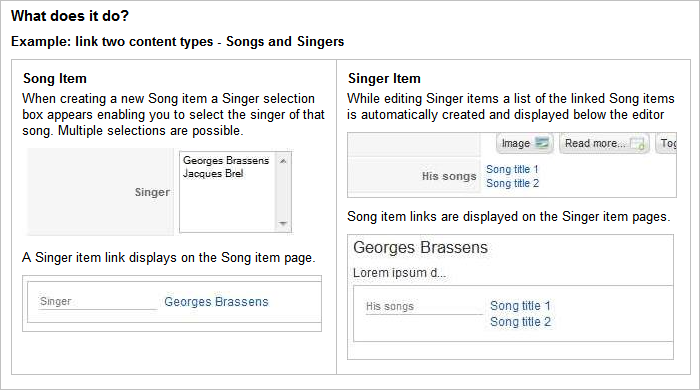
If anyone else has other examples of how they have used these plugins, please post a quick note and a link if possible.

Have started some documentation (mostly for myself right now).

[attachment=0:1aam2naw]<!-- ia0 -->Example-link-two-content-types-Songs-andSingers.png<!-- ia0 -->[/attachment:1aam2naw]

.

Please Log in or Create an account to join the conversation.

More
16 years 2 weeks ago #3283 by ComposerRyan
WOW!!! This plugin is simply amazing and was EXACTLY what I was looking for. This should actually be a permanent plugin.

There was one thing I noticed:

When accessing my article from my category it generated like this (with Joomla SEF URLs enabled):

www.mysite.com/video-games/item/ ... cific-rift

But when I click on it through the plg_flexicontent_fields_selectflexiitem_v02.zip plugin it looks like this:

www.mysite.com/video-games/item/92

I guess it's no big deal...but it leaves off the "-motorstorm-pacific-rift" part. Is there anyway that could be fixed?

Thanks a lot again for this AMAZING plugin that extends the functionality of Flexiconent even further!

Please Log in or Create an account to join the conversation.

More
16 years 2 weeks ago #3285 by ComposerRyan
I did notice another problem when using plg_flexicontent_fields_selectflexiitem_reverse_v02.zip

1) How can I order them by date?

2) Also, can I include the intro text and assign # of characters before it says "read_more"

3) And how can I display the date of the article as well? This part is no big deal, but would be an added bonus!

The reason I request this is because you can display news now INSIDE of an article, which is exactly what I need! I was disappointed to see that it sorted by name only and not date...plus, there was no intro text. :(

If you could some way add these elements to it, that would be amazing. Thank you again for this plugin.

Please Log in or Create an account to join the conversation.

More
16 years 2 weeks ago #3291 by conquerlol
Hello,

First of all thank you so much for this plugin, now i can link my articles around. :mrgreen:

I have a suggestion/request...can you make it so that we can show one of the field from the selected article instead of the title? I made an image field in flexi for the type so I wanted to show that instead of the title link to it. Like you want to show the face of the singer so people can easily see instead of the title. How about multiple fields, like the image and then title below it.
If someone point me to the right direction as to how to do that, it would be helpful too. :D

Also, if you use the plugin on the same type, it won't work? Like you can't link your singers to your singers.

The plugin is great, thanks again.

Please Log in or Create an account to join the conversation.

More
16 years 2 weeks ago #3296 by yopyop001
Hi,

First, thanks for your feedbacks.

I think i will wait for the Flexicontent stable release to update the plugin. But i keep your request in my mind.

@ComposerRyan

1) How can I order them by date?


In the selelect_flexiitems_reverse parameters, you can choose in what order the items are displayed. May be you have to clean the cache after you modify this parameter. But it's working for me.

2) Also, can I include the intro text and assign # of characters before it says "read_more"


It'll be great to can choose in the plugin parameters all the fields we want to display. But i'm waiting for the next Flexicontent version to see if there is a simple way to do that.

For now, i think you can use the Include content Item plugin from kksou ( www.kksou.com/php-gtk2/Joomla/Include-Co...em-plugin.php#fadein ) to display introtext and readmore Link.
In the selelect_flexiitems_reverse parameters, you have to choose : 'Trigger content plugins' : yes and select 'Include-Content-Item', Display : 'Value', Add a link : 'No'; Prefix : {include_content_item Suffix: "params_of_include_content_item" }
I didn't test this solution, but it is an idea

3) And how can I display the date of the article as well? This part is no big deal, but would be an added bonus!


Same answer that 2). I will have a look at this

@conquerlol
For your suggestions, i'm agree with you : as for questions of ComposerRyan, it will be great to choose the fields we want to display, but i had a look at this, and i didn't find a good method.
I think we can load fields directly in the template. But just wait for the next Flexicontent release to see if there is a generic way to do that.

if you use the plugin on the same type, it won't work?

It works for same type items. (you can just link article together, if you want)


I hope my english is understandable,
Rgds

Please Log in or Create an account to join the conversation.

Moderators: vistamediajoomlacornerggppdk
Cookies user preferences
We use cookies to ensure you to get the best experience on our website. If you decline the use of cookies, this website may not function as expected.
Accept all
Decline all
Essential
These cookies are needed to make the website work correctly. You can not disable them.
Display
Accept
Analytics
Tools used to analyze the data to measure the effectiveness of a website and to understand how it works.
Google Analytics
Accept
Decline
Save